AI SEO Agent & Consultant: a practical guide
In shortAI SEO Agent & Consultant is RankZoro’s workspace-based conversational assistant for practical SEO and GEO work. It can help research keywords, check rankings, analyse backlinks, interpret uploaded images or PDFs, and advise on connected website improvements. You remain in control: the agent explains proposed actions, waits for your confirmation, and lets you review what happened before continuing.
Inside AI SEO Agent & Consultant
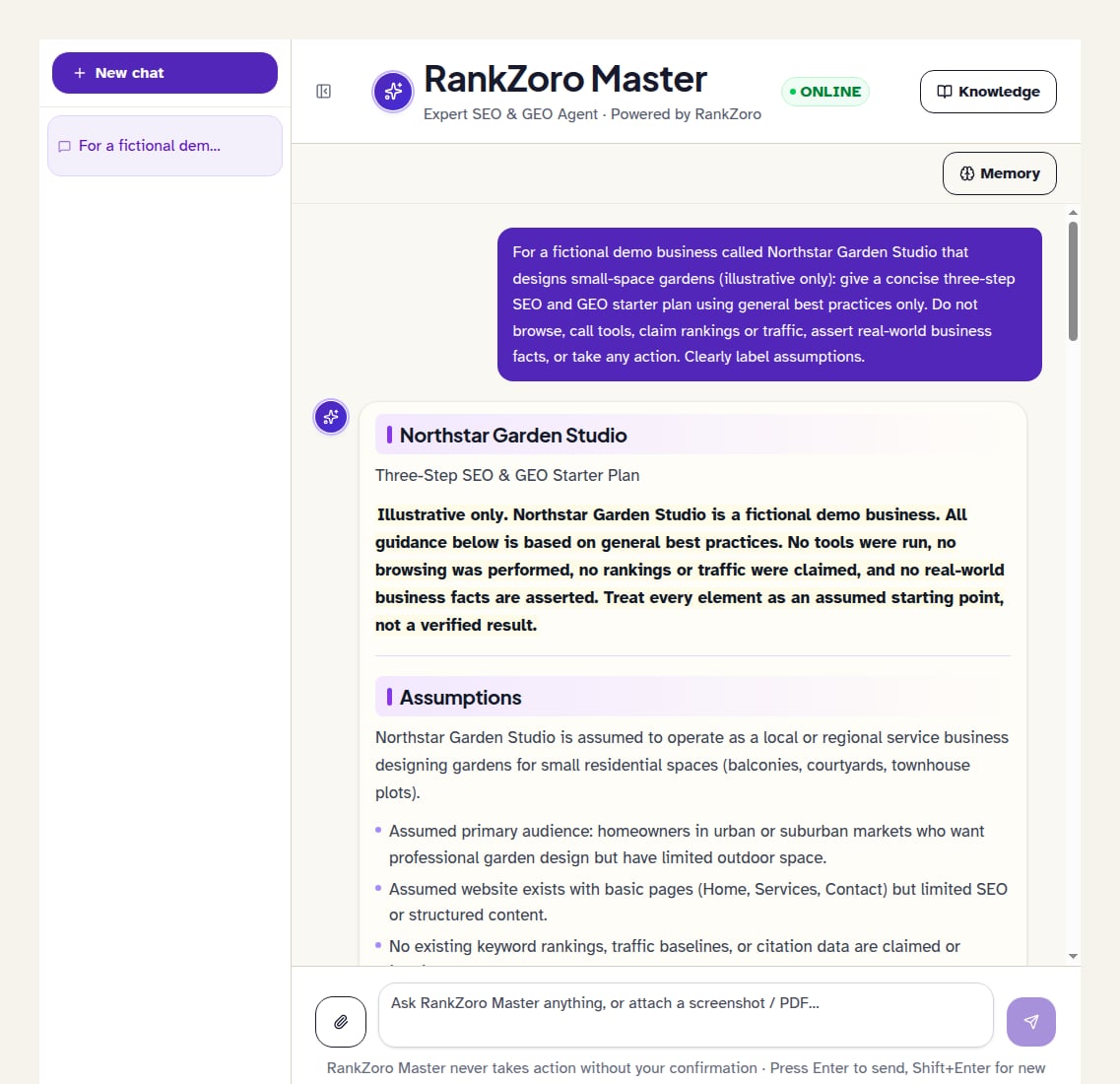
What can AI SEO Agent & Consultant help you do?
The agent is designed for SEO work that normally requires moving between research, analysis, content planning, and website administration. You can ask it to research keywords for a niche, check where a keyword ranks, examine backlink information, compare SEO and GEO priorities, or suggest a strategy for a new website. GEO, or generative engine optimization, means improving how clearly and reliably a business may be represented in answers produced by AI search systems. The agent can discuss that work alongside traditional search optimization rather than treating them as separate disciplines.
The most useful way to think about the tool is as a working consultant inside your RankZoro workspace. It can interpret your questions, use relevant workspace context, and propose the next practical step. Some requests are informational: the agent may explain a concept, organise a plan, or interpret information you provide. Other requests involve a real check or a connected website change. In those cases, the conversation can present a proposed action for your review.
The agent does not silently apply changes when a connected site is involved. A supported action appears with a confirmation request, a summary of its inputs, and a preview where the workflow supports one. Nothing runs until you choose to confirm it. If you decline, the agent can continue the conversation without carrying out that action. This distinction is important: the assistant can prepare and coordinate work, but you decide which proposed operations should be executed.
How do you start a useful conversation?
Open the AI SEO Agent & Consultant workspace and begin a new conversation when you want a separate working thread. The conversation list lets you return to earlier discussions, select an existing thread, or remove one you no longer need. Keeping related questions together gives the agent useful continuity, while separate conversations are helpful when you are working on different sites, campaigns, or clients.
Start with a question that names the subject, the desired result, and any important limits. For example, you could write, “Research keywords for an illustrative fictional business called Harbor & Hearth, a small online shop selling handmade ceramic mugs. Group ideas by search intent and suggest which topics deserve content first.” This gives the agent a business context, an audience, and a decision to support. If you already know the country, language, product category, or target page, include those details as well.
The empty workspace offers several starting ideas, including asking how to get a brand cited in ChatGPT answers, checking a keyword ranking, researching keywords for a niche, comparing SEO and GEO, and asking which content types are commonly cited by AI engines. These prompts are starting points rather than fixed commands. You can refine the answer with follow-up questions such as, “Which of these topics should become product content, and which should become educational content?”
You can type a message and press Enter to send it. Use Shift+Enter when you need a new line before sending. If your request needs more explanation, provide the background first and then state the decision you want help making. Clear context generally produces a more useful discussion than a very broad request such as “Improve my SEO.”
How should you provide business and website context?
SEO recommendations depend on details such as what a business sells, who it serves, which locations matter, and what the website is already trying to achieve. Give the agent enough context to distinguish a page aimed at buying from a page aimed at learning. For the fictional Harbor & Hearth shop, explain whether the priority is ceramic mugs, gift collections, wholesale enquiries, or all three. You can also describe the brand voice, important products, existing content, and any subjects the business does not want to cover.
The workspace includes an agent memory area and a knowledge panel. The memory feature is available alongside the conversation, while the knowledge panel is intended for documents that should inform future, context-aware answers. You can add a webpage by providing its URL, or add a text document by entering a title and pasting the content. Suitable material might include a brand guide, product information, service descriptions, editorial principles, or a carefully written description of the business.
Knowledge documents should be treated as working reference material, not as a replacement for checking facts. Before adding a document, remove obsolete offers, incorrect contact details, or instructions that no longer apply. Give documents clear titles so you can recognise their purpose later. If the business changes direction, review the stored material and remove documents that could lead the agent toward outdated advice.
When you ask a question, explain whether the agent should use the stored business context. For example, “Using our brand guidance, propose a content brief for beginner pottery gifts” is more precise than “Write something about pottery.” The agent can then connect the request with the information you have chosen to keep in the workspace.
When should you attach an image or PDF?
The agent accepts image attachments in PNG, JPEG, WEBP, and GIF formats, as well as PDF documents. This makes the conversation useful when the information you need to discuss is not convenient to paste as text. You might attach a screenshot of a search result, a page layout, a technical warning, a content outline, or a report page and ask the agent to explain what it shows and what should be investigated next.
Attachments are most useful when you include a specific question. Instead of uploading a screenshot and asking for a general opinion, write, “Review this illustrative fictional business’s page screenshot for title, heading, navigation, and conversion clarity. Separate observations from recommendations.” If you attach a PDF, identify the pages or subjects that matter, such as backlink findings, a content brief, or a site review. The agent can then focus its interpretation on the decision you need to make.
The interface shows attached files before you send the message, and you can remove an attachment from the pending message if you selected the wrong file. Images can be previewed in the composer, while PDF documents are represented as file attachments. Supported files are limited to the formats the workspace accepts, and each file must be no larger than 5 MB. If a report is larger, divide it into relevant sections or paste the key passages instead.
An attachment gives the agent material to discuss; it does not automatically change a page or prove that a reported issue exists across an entire site. Treat visual observations as a starting point for investigation. Ask the agent to connect the evidence to a ranking check, content decision, or approved website workflow before acting on it.
How can you use the agent for keyword research?
Begin keyword research by defining the business, audience, offer, and purpose of the research. Ask for ideas around a particular service, product group, or customer problem rather than requesting an unstructured list. For the fictional Harbor & Hearth shop, a useful request might be, “Research search topics for people choosing handmade ceramic mugs as gifts. Distinguish product-led, comparison, care, and inspiration themes.” You can then ask the agent to organise the ideas by search intent, meaning what the searcher appears to want to accomplish.
Use the conversation to turn research into decisions. Ask which topics belong on existing category or product pages, which deserve buying guides, and which may be too broad for the current site. You can ask for a content brief that includes the intended reader, primary question, supporting questions, recommended page type, and internal links to consider. This connects keyword research with content planning rather than leaving it as a spreadsheet of disconnected phrases.
The agent can also help you identify gaps in your current coverage. Tell it which pages already exist and ask whether a proposed topic duplicates an existing page or serves a distinct intent. If you upload a content plan or paste a list of URLs, ask for a structured review. Keep in mind that a recommendation is not the same as evidence of demand or ranking potential. Validate important decisions using the relevant research and measurement information available in your wider SEO process.
After choosing a topic, ask the agent to convert the decision into a practical brief. Include the intended audience, the page’s role, the desired action, and any brand requirements stored in the knowledge base. Later, return to the same conversation to compare the planned topic with ranking observations or content performance information.
How do ranking checks fit into the conversation?
You can ask the agent to check where a keyword ranks, but make the request specific enough to interpret. State the exact phrase, the relevant website or page if known, and the market or search context that matters to you. For the fictional business Harbor & Hearth, you might ask for a check on “handmade ceramic mugs gifts” and then clarify whether the goal is to understand the visibility of the shop’s gift collection page or its educational buying guide.
A ranking result is a measurement for a particular query and context, not a permanent description of a website. Read it alongside the page’s intent, the wording of the search, and the content currently aimed at that topic. If the result is weaker than expected, ask the agent to investigate possible explanations such as a mismatch between query and page purpose, unclear page structure, insufficient supporting content, or a need to examine competing search results. Do not treat a single position as proof that one specific change will produce an improvement.
The agent can help turn a check into a next-step list. Ask it to separate observations from hypotheses and to identify what should be verified before editing anything. For example, it might suggest reviewing the target page, related internal links, title and heading clarity, or the coverage of the topic elsewhere on the site. This keeps the workflow evidence-led and prevents a ranking check from becoming an automatic rewrite.
Use later checks to assess whether the work you chose was worth continuing, but keep the comparison consistent. Changes in query wording, location, page targeting, or search context can make two measurements difficult to compare. The agent can help document what was checked and why, while your team remains responsible for deciding how to interpret the result.
What can you ask about backlink analysis?
Backlinks are links from other websites to your site. They can be useful signals to investigate, but their value depends on relevance, context, destination, and the quality of the referring page. Ask the agent to analyse backlink information with a clear purpose, such as identifying patterns, reviewing links to an important page, or organising potential concerns for human inspection. Explain whether you want a high-level summary or a detailed review of particular links.
For an illustrative fictional business, suppose Harbor & Hearth has received links from craft publications, local directories, supplier pages, and unrelated websites. You could ask the agent to group those links by relevance and explain what should be manually reviewed. Follow up by asking which links appear useful for referral visibility, which may be low-context, and which require confirmation before drawing conclusions. The agent’s analysis should guide investigation rather than serve as an automatic verdict about a website or publisher.
Backlink analysis connects naturally with content planning and outreach decisions. If relevant craft websites link to a useful care guide but not to a product collection, ask whether the collection needs stronger supporting information or clearer internal linking. If the analysis reveals that a topic attracts references, use that insight to improve the resource without assuming that creating a similar page will earn links.
Avoid asking the agent to label every unfamiliar link as harmful or to recommend removal without evidence. Ask for reasons, missing information, and sensible verification steps. A well-framed review distinguishes what the available data shows from what still needs checking, which makes the result more useful to an experienced SEO practitioner and safer for a less technical website owner.
How do connected WordPress and Shopify improvements work?
When your workspace has a supported WordPress or Shopify connection, the agent can help prepare improvements for the connected site. The conversation is the planning layer: describe the page, the problem, and the intended outcome, then ask what change is appropriate. For the fictional Harbor & Hearth store, you might ask for an improvement to a product page’s search title, description, or content structure, provided that the requested operation is supported for the connected system.
The agent may propose an action instead of applying it immediately. The proposal identifies the action, displays the non-empty inputs being used, and, for WordPress-related workflows where applicable, provides an approval preview. Review the target, wording, page details, and any other values carefully. This is your opportunity to correct an ambiguous instruction, narrow the scope, or decline the change altogether.
Connected website work should be separated into two stages. First, use the agent to diagnose the issue and prepare a precise improvement. Second, review the proposed operation and decide whether to confirm it. Confirming permits that supported action to run; it does not mean every recommendation in the conversation has been implemented. If the action fails, the conversation identifies that it did not complete, allowing you to investigate rather than assuming the website changed.
The available workflow is not a promise that every WordPress or Shopify task can be executed. Some recommendations may remain instructions for a person to implement, especially when the requested change is outside the supported actions. Ask the agent to explain what it can prepare and what still requires manual work. After an approved change, request a review of the result and compare it with the original objective.
What should you check before confirming an action?
A confirmation card appears when the agent has proposed an action that requires your approval. It identifies the proposed operation and lists the meaningful inputs, such as a page, phrase, title, or content value. Read these fields as a compact change review. Make sure the target is the intended site and page, the wording reflects the brand, and the scope matches what you asked for.
The card also makes clear that nothing runs until you confirm. Choosing to confirm sends the proposed operation for execution, after which the agent can continue with the returned result. Choosing to decline cancels that proposed operation. The conversation is then available for a different instruction, a revised proposal, or a discussion of why the action was not suitable. You are not required to approve an action simply because the agent suggested it.
If an action involves editorial content, read it as carefully as you would read a draft prepared by a colleague. Check accuracy, claims, tone, spelling, product details, and whether the content serves the page visitor. For a fictional business, do not approve a description saying Harbor & Hearth offers materials, delivery terms, or guarantees unless those details are true. SEO relevance does not make inaccurate copy acceptable.
After execution, ask the agent to summarise what was returned and what should be reviewed next. A successful execution means the supported request ran; it does not establish that rankings, traffic, or conversions will change. Treat the result as one step in a broader measurement and editorial review process.
What is a sensible repeat workflow for ongoing SEO work?
A practical repeat workflow begins with context, moves through research, and ends with review. First, keep the knowledge base current with accurate brand and website information. Next, use the agent to identify a business question, such as which topic deserves a new guide or why a target page is not matching a search intent. Then request the relevant research: keyword ideas, a ranking check, backlink analysis, or an interpretation of an uploaded report.
After reviewing the evidence, ask the agent to turn the findings into a prioritised plan. A useful plan distinguishes urgent corrections from worthwhile improvements and longer-term content work. It should state the target page, the intended audience, the reason for the change, and how you will judge whether the work deserves further attention. This makes it easier to avoid a long list of vague recommendations.
If a supported WordPress or Shopify change is appropriate, ask the agent to prepare it and inspect the confirmation details. Approve only the action that matches your reviewed plan. For work outside the supported connected actions, use the agent’s instructions as a guide for manual implementation. Record what was changed, even if that record remains in the conversation, so a later review has a clear starting point.
Return to the conversation with updated observations, a new screenshot, or another relevant document when you need to assess the work. Ask what changed, what remains uncertain, and what should be measured next. Repeating this cycle keeps research, content, website changes, and measurement connected without assuming that every recommendation needs immediate execution.
How can you get clearer, safer answers?
The best prompts give the agent a role, a subject, useful context, and a requested format. For example: “Act as an SEO adviser for the illustrative fictional business Harbor & Hearth. Review these three proposed page topics, group them by customer intent, identify overlap, and recommend one next step for each.” You can ask for tables, bullet points, assumptions, questions that need answering, or a distinction between evidence and recommendation.
When an answer feels too broad, narrow the task rather than repeating the same request. Ask, “Focus only on the category page,” “Use the brand guidance in the knowledge base,” or “Explain which part is an observation and which part is a hypothesis.” If the agent misunderstands a business fact, correct it directly and update the relevant knowledge document if the correction should apply in future conversations.
If a proposed action contains the wrong page or wording, do not confirm it. Ask for a revised proposal with the correct target and explain the change needed. If an action fails, read the reported result and ask what information is missing or what alternative workflow is available. A failed action is a reason to investigate, not a reason to assume a partial change occurred.
Use attachments thoughtfully, keep documents relevant, and avoid sending sensitive material unless it is appropriate for your workspace. The agent can analyse what you provide, but it cannot replace your knowledge of the business, editorial judgement, or review of a consequential website change. Treat the conversation as collaborative decision support: specific questions, accurate context, careful approval, and deliberate follow-up produce the most dependable workflow.
Frequently asked questions
Does AI SEO Agent & Consultant make website changes automatically?
No. When a supported WordPress or Shopify action is prepared, the agent presents it for your review. Nothing runs until you confirm it. Recommendations that are not supported as connected actions remain guidance for you or your team to implement.
Can I use screenshots and PDF reports with the agent?
Yes. The workspace accepts PNG, JPEG, WEBP, and GIF images, along with PDF documents. Each file must be no larger than 5 MB. Include a focused question so the agent knows what to inspect.
Can the agent check rankings and research keywords?
Yes. You can ask it to check where a keyword ranks or research topics for a niche. Provide the relevant website, market, page, audience, and business context so the results can be interpreted appropriately.
What should I store in the knowledge base?
Store accurate, useful reference material such as brand guidance, product or service details, audience information, and editorial preferences. Remove outdated documents and incorrect claims so future conversations receive reliable context.
What happens if I decline a proposed action?
The proposed operation is cancelled, and the conversation can continue. You can ask for an explanation, revise the inputs, request a different recommendation, or work through the change manually.
Keep going
Put AI SEO Agent & Consultant to work
Use the AI SEO Agent & Consultant workflow with the inputs and limitations explained above. Review any generated suggestions before acting.